
Three to five VS Code windows open in different projects, four to six Claude sessions running in each. Any one of them could be working, finished, blocked on a permission prompt, or waiting on a decision only I could make, and the only way to find out was to go and look. I found the ones that were waiting on my next pass through the windows, maybe every 20 minutes, sometimes much longer.
A friend (thanks Pat Santora!) pointed me at Herdr and said it might get all of that into one place.
So I moved every session out of VS Code's integrated terminal into Herdr, running standalone in iTerm2, one workspace per repo. The editor is now purely for reading and editing code. What I get back is a sidebar that reports what every agent in every project is doing, without me going to look.
This is for people running more agents than they can hold in their head — several repos, several sessions in each. If you run one session in one repo, the terminal you already have is fine.
TL;DR
With 12 to 30 sessions across 3 to 5 windows, I was the only thing that knew when one of them needed me, and I only knew by going and looking.
Herdr is a terminal multiplexer — tmux's category — that knows which of its panes are running agents. One workspace per repo, and the sidebar reports each agent as working, idle, done, blocked or unknown, across every project at once. There are audio cues too.
The lag from a session needing me to me knowing about it went from about 20 minutes — my next pass through the windows — to under a minute. Nothing became automatic: what I do when I get there is unchanged, and I still start every one of those actions myself. Only the noticing moved.
I didn't wait for the migration to break things. I listed the two workflows I refused to lose and solved both before switching: my tmuxp layouts, and Ctrl+Shift+W to jump between projects without touching the mouse.
One already existed as a plugin and needed two upstream PRs to fit; the other I wrote. Neither took a day.
Herdr: herdr.dev. The project-jump plugin: github.com/agentience/herdr-plugin-ide-jump
Here is the artifact, from this machine, right now — every pane in every project that has an agent in it:
w8  client-a         w8:pP  claude  working  spreader-label-normalise
w8  client-a         w8:pD  claude  idle     Starting without starting
w8  client-a         w8:pH  claude  idle     Claude Code
w8  client-a         w8:pQ  claude  idle     Claude Code
wA  tribal-markdown  wA:p2  claude  idle     Startup baseline exploration
wH  client-b         wH:p7  claude  idle     Claude Code
wR  ide-jump         wR:p4  claude  idle     Plugin Windows compatibility verification
wS  herdr-spreader   wS:p1  claude  idle     Claude Code
Twelve workspaces on this machine, one per repo. Eight panes had an agent in them at the moment I captured that. Client project names are redacted, nothing else is. In the terminal this is a sidebar rather than a list I ask for, and the fourth column is the whole point: one working, seven waiting on me.
The noticing was the problem
An agent session asks for you in several different ways. It finishes and sits idle. It stops on a permission prompt and waits. It reaches a decision it can't make — which of two approaches, whether to touch a file it wasn't asked to touch. It runs long enough that the useful thing to do is end it and carry the state forward, the one case I'd already built machinery for. Every one of those is the same event from where I sit: this session is now waiting on me.
With four to six sessions in a window and three to five windows, the only way to catch that event was to look. So I looked, in rounds: cycle the windows, read what each session was doing, deal with anything finished or blocked, go back to whatever I'd been doing. Between rounds, a session that stopped sat there. Twenty minutes was a good pass; some were much longer.
Now the state is reported to me instead. A session that goes quiet shows as idle in a list already on screen, and I answer it in under a minute — or I see it and know it's something to get to as soon as I can, which is a different and equally useful thing to know. Herdr classifies each agent pane as working, idle, done, blocked or unknown, and two of those carry most of the value. done is the same quiet pane as idle, labelled differently because the work finished while I wasn't looking at that tab. blocked means Herdr recognised an approval or question prompt on screen. "It finished" and "it's stuck on me" are the two things I most need to tell apart from across the room, and they're now different words in a list rather than two screens that look alike.
Nothing became automatic. Every action I take when I get there, I still start myself. What changed is when I find out. A session that wants an answer, a decision or a handoff now says so while it is waiting, rather than on my next lap through the windows. The improvement is entirely in the gap between a session needing me and my knowing about it, and that gap was the cost.
Adapting to Herdr, and adapting Herdr to me
The sessions moved out of the editor, one workspace per repo, and I learned Herdr's shape rather than reaching for the tmux commands I already knew. That part I just took.
But I wanted to keep some of the niceties of the workflow I already had. Before moving, I named the two things I use constantly and would notice losing, and went at them before they could become problems:
My tmuxp layouts. I like being able to launch or re-establish the several windows I'm used to in a repo without re-initialising them each time. Herdr has no equivalent config file. The server persists workspaces, tabs, panes and their directories itself, which covers the normal day but not a machine that has just come up. I looked at how to solve that, checked the plugin marketplace, and found a near-exact solution already there: herdr-spreader, which applies tmuxinator-style layouts from YAML.
Near-exact, not exact. It could build a layout but not re-apply one — every run created a second copy of everything — and its layouts had to live in one central file rather than in the repos they describe. Both gaps went upstream as PRs: --on-existing create|skip|sync so a re-run adds only what's missing, and include: so the central config can point at a layout file that ships with each repo. A stranger was running the first one within a day and found a real defect in it: my tab matching compared labels exactly, so another plugin that renumbers tabs to [1] name made every tab look missing and duplicated the lot. They diagnosed it and proposed the fix, which is now in.
Ctrl+Shift+W. In VS Code that hotkey is how I switch projects — pick the one I want from a list, no mouse, no hunting through windows. Nothing in Herdr did that, so I wrote ide-jump: a plugin that raises the editor window for the project a pane belongs to, either directly or through a filterable picker with the current repo already selected. It was built before it became an issue, which is the part I'd repeat. It has since taken an outside contribution adding a Windows backend, and it works with editors other than VS Code.
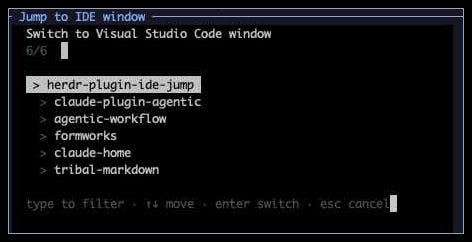
Two gestures, two solutions, neither of them a day's work. What made it cheap was that the platform had a seam wherever I needed one — a plugin marketplace with a maintained project already in it, and an upstream that takes PRs.
What VS Code is for now
Reading and editing code. That's it.
That reads like a small change and isn't: the integrated terminal was where every agent lived, which meant the editor window was also the session window, and the two were stuck together. Pulling them apart is what let the sessions be listed somewhere else. It's also why ide-jump had to exist before the move rather than after — with the terminal outside the editor, "get me to the code for this project" becomes a gesture that needs its own answer.
What it still costs
Jumping back and forth between the terminal window and each of my IDE sessions is a habit I'm still building. The plugin helps a lot — that's what it's for — but going from one window that held both to two windows that hold one each is a real change, and I notice it.
That's the trade the whole thing rests on: the terminal and the editor stopped being the same window, and in exchange every agent in every project reports its state to one place.
Try it
Herdr — herdr.dev. Start it, make a workspace per repo, and run your sessions in it. The status list is the feature; everything else here is me refusing to give up two gestures.
herdr-spreader —
herdr plugin install yuk1ty/herdr-spreader, if you want your layouts back. The idempotence and repo-local-layout PRs (#17, #18) are open at the time of writing, so check whether they've landed before you rely on--on-existing sync.ide-jump —
herdr plugin install agentience/herdr-plugin-ide-jump. Note that title matching needs your editor to put the folder name in the window title; VS Code needs"window.title": "${rootName}"for this to work.
If you're deciding whether it's worth it, the question I'd ask is the one Pat effectively asked me: how do you currently find out that a session needs you? If the answer is "I go and look," that's the thing this replaces.